
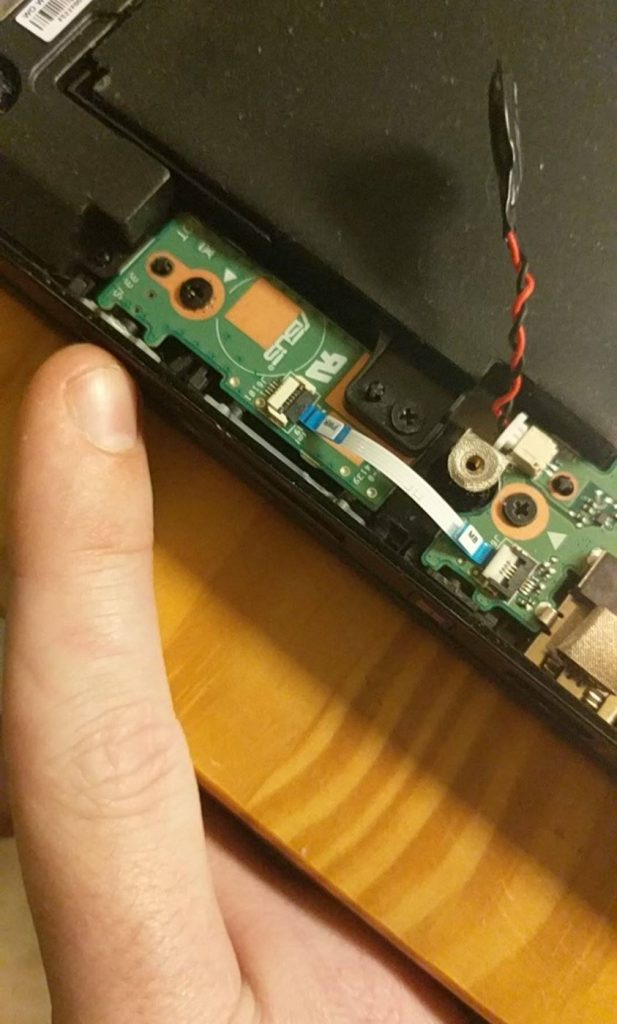
When an ASUS laptop stops charging, the culprit is often not the battery or charger, but the charging port, power jack, or DC-in board—especially if the charger feels loose or only works at certain angles.
I recently diagnosed this exact issue for a client in Redding, CT. After opening the system, the fault traced back to the power jack / DC-in board area. This is a repair worth addressing early, before a temperamental connection becomes complete failure.
Signs Your ASUS Laptop May Need Charging Port Repair
A failing charging port or power jack can cause:
- The laptop only charges when the cord is moved into a certain position
- The plug feels loose in the port
- Charging cuts in and out
- The battery does not charge even with the adapter connected
- The laptop loses power when the cable shifts
- The system will not power on reliably while plugged in
Diagnosing the Real Cause
To isolate the problem, I checked:
- The charger connection and charging jack
- The DC-in board
- Internal cables and ribbon connections
- The surrounding board area for strain or damage
Many ASUS laptops use a separate DC-in board rather than placing the charging jack directly on the motherboard. This makes repairs more practical and cost-effective than replacing the entire motherboard.
Why Early Repair Matters
Charging issues rarely stay minor. What begins as occasional connection loss often escalates to complete failure, random shutdowns, battery drain, and connector damage. Addressing the problem early prevents costly repairs and unnecessary downtime.
Local ASUS Laptop Repair in Redding, CT
At Complete Computer, I help Redding, Bethel, Danbury, Brookfield, Ridgefield, and Newtown clients with:
- ASUS laptop charging port and power jack repair
- DC-in board diagnosis and replacement
- Laptop not charging troubleshooting
- SSD upgrades, virus removal, and Windows repair
When the rest of your laptop is in good shape, a targeted charging port repair is far more practical than replacing the entire machine.
Frequently Asked Questions
Why is my ASUS laptop plugged in but not charging?
A failing charger, battery, charging port, power jack, or DC-in board could be responsible. Professional diagnosis pinpoints the actual culprit.
Can an ASUS laptop charging port be repaired?
Yes. Most ASUS models use a separate charging board or power jack assembly, which can be repaired or replaced without replacing the motherboard.
What are the signs of a bad laptop power jack?
Look for loose connections, intermittent charging, charging only at certain angles, or the laptop losing power when the cable shifts.
Do you offer laptop repair near Redding, CT?
Yes. I serve Redding, Bethel, Danbury, Brookfield, Ridgefield, Newtown, and nearby towns with laptop hardware and charging diagnostics.
ASUS Laptop Not Charging? Get It Fixed
If your laptop has a loose charging port, only charges at certain angles, or won’t stay powered, it likely needs DC-in board or power jack repair.
Complete Computer provides practical laptop repair for Redding, Bethel, Danbury, Brookfield, and Ridgefield.
Leave a Reply